
This is only for creating the boilerplate structure for the microservice – it does not have any specifications for API code requirements.
Repository
You will need a Bitbucket account to access the below respositories.
Remote Flow Core API: rf-remoteflow-microservices-api
Timeflow API: tf-timeflow-microservices-api
Setup folders and files
- Create the folder name for the microservice (should be specified)
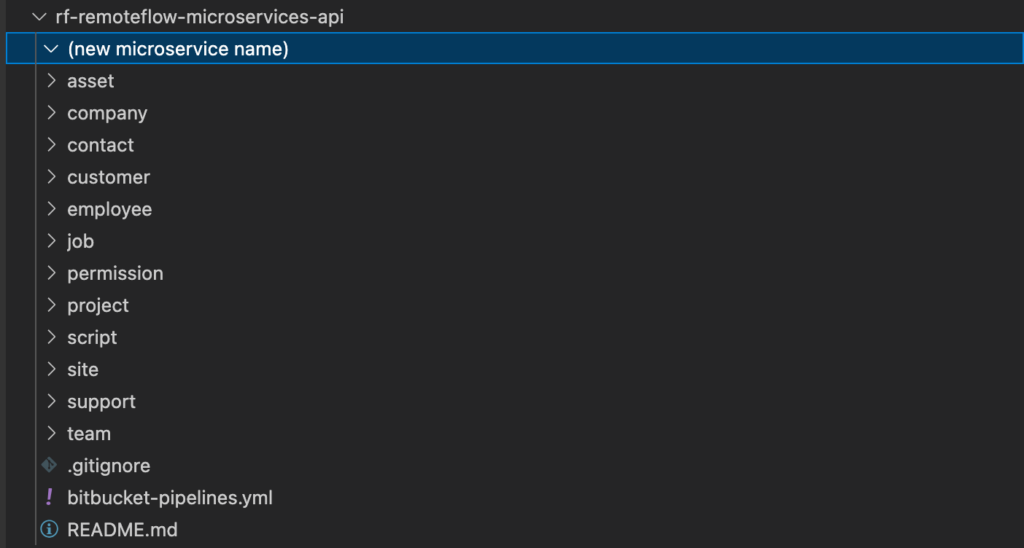
- Add the folders and files
- These can by copied and pasted from a previous microservice
- Not all route files may be required – e.g. PATCH – this will be determined by the service and spec
- Sometimes, there may be “specific” routes that are unique to the service –
e.g. GET /service/{serviceID}/approve
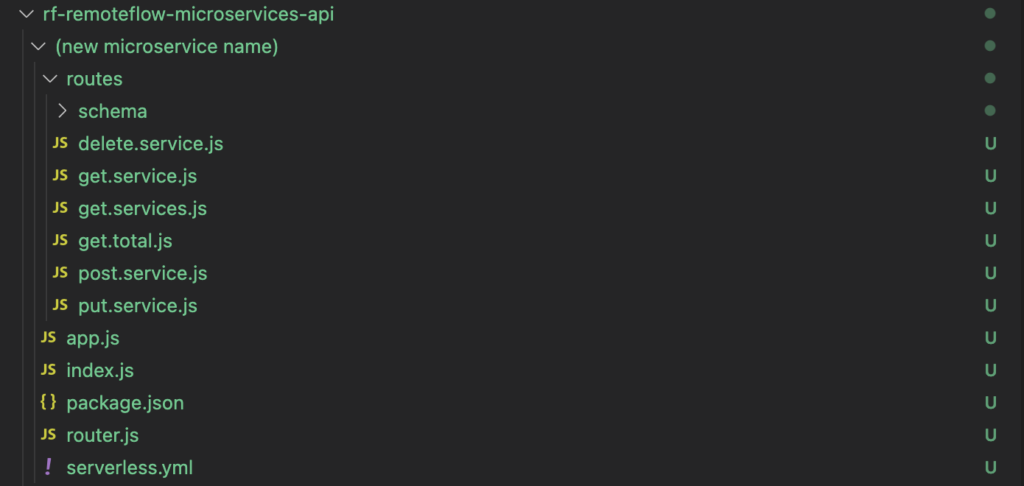
- Copy and paste the content from previous files and modify as expected
- It’s important that router.js structure is consistent as it has references to ENV variables required for the microservice to work
- Make sure app.js has the /(service) and /:clientID/(service) route handlers – it’s required for the API Gateway!
Optional: Setup serverless for localhost testing:
#install serverless on local machine
npm install -g serverless

#run microservice
#Note: function parameter is based on the serverless.yml config template
serverless invoke local --function api

#access local API via http://localhost:8080/{route}
Some considerations:
- Only one microservice can be run locally at one time
- Please test code via API Gateway as well before confirming task is ready to go
- Comment out (or delete) any localhost API requests in the front end code before committing
Update bitbucket-pipelines.yml
- You can copy an existing rf-api-servicename-dev block from bitbucket-pipelines.yml to adjust accordingly
- Just replace the {servicename} placeholders – the structure is required for existing microservices
    rf-api-{servicename}-dev:
      - step:
          name: Build and package DEV
          script:
            - cd {servicename} && npm install --production
            - zip -r ../rf-api-{servicename}-dev.zip .
          artifacts:
            - rf-api-{servicename}-dev.zip
      - step:
          name: Update Lambda
          deployment: test
          script:
            - pipe: atlassian/aws-lambda-deploy:0.2.1
              variables:
                AWS_ACCESS_KEY_ID: ${AWS_ACCESS_KEY}
                AWS_SECRET_ACCESS_KEY: ${AWS_ACCESS_SECRET}
                AWS_DEFAULT_REGION: 'ap-southeast-2'
                FUNCTION_NAME: 'rf-api-{servicename}-dev'
                COMMAND: 'update'
                ZIP_FILE: 'rf-api-{servicename}-dev.zip'
Last Updated: 13th February 2023